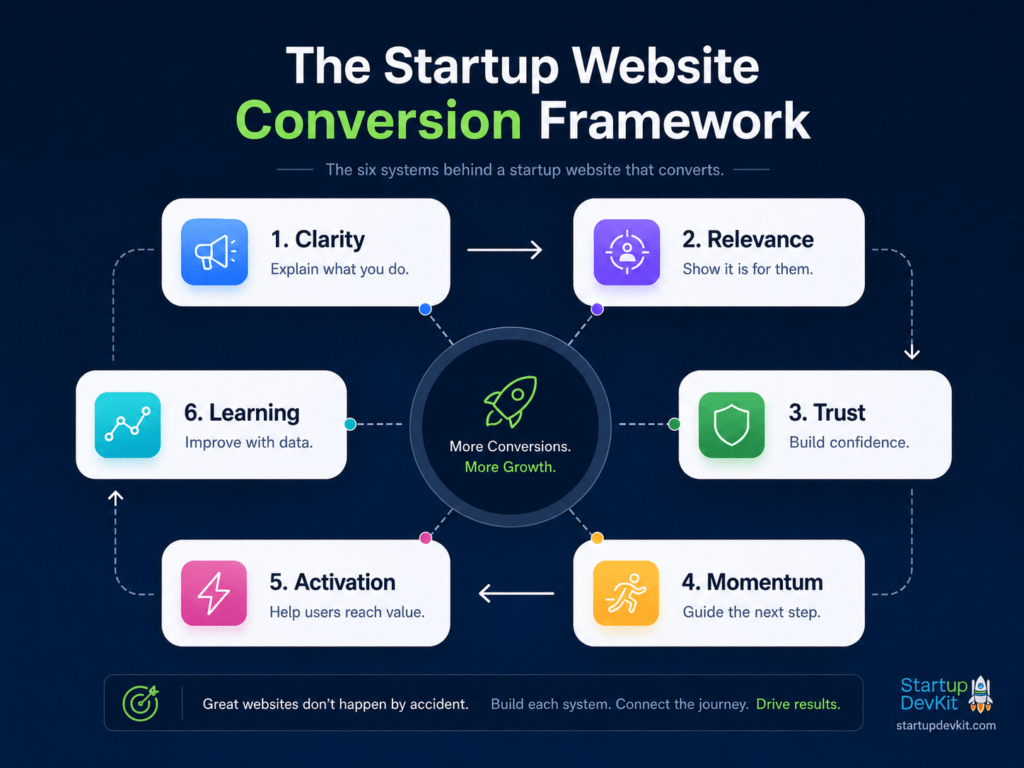

Your startup website is not just a digital brochure. It is one of the most important conversion systems in your business. And that means you are going to need to nail your startup website structure and the positioning copy in it.
A strong startup website should help visitors quickly understand:
- who you help
- what problem you solve
- why your solution matters
- what makes you different
- what they should do next
That next step might be joining your email list, starting a free trial, creating a free account, viewing your pricing page, booking a demo, buying a product, or joining your platform.
But conversion does not happen because you add a few buttons to a page.
It happens when your website creates clarity, builds trust, reduces friction, guides attention, and moves visitors through the right decision-making path.
In 2026, this matters even more because founders have access to more AI tools, website builders, templates, design systems, and automation software than ever before. But that also means the internet is filled with generic websites, vague AI-generated copy, and startup pages that look polished but fail to explain why anyone should care.
Your goal is not just to have a good-looking website.
Your goal is to build a website that helps the right people understand your value and take action.
This guide will show you how to structure a startup website that converts, including your homepage, product pages, pricing page, navigation, calls to action, visual design, videos, lead capture paths, and AI-assisted workflows that can help you build and improve the site faster.
What a Startup Website Needs to Do
A startup website should do several jobs at once.
It should explain your startup clearly, communicate the value of your product or service, reduce uncertainty, and move visitors toward the next best action.
At a minimum, your website should answer these questions:
- Who is this for?
- What problem does it solve?
- Why does this problem matter?
- How does the product, service, or platform work?
- What makes it different?
- What does the visitor get if they sign up or buy?
- What should they do next?
- Can they trust you?
If your website does not answer those questions, visitors may leave even if your startup is genuinely valuable.
People do not want to work hard to understand your offer. They scan pages, compare options, look for signals of trust, and quickly decide whether your product feels relevant to them.
That is why your website needs more than attractive design.
It needs strong messaging, smart visual structure, fast performance, clear calls to action, helpful content, and a conversion path that matches the visitor’s stage of awareness.
The Startup Website Conversion Framework
Before you start writing sections or designing pages, it helps to think of your startup website as a conversion framework.
A high-converting startup website usually depends on six things:
- Clarity
- Relevance
- Trust
- Momentum
- Activation
- Learning
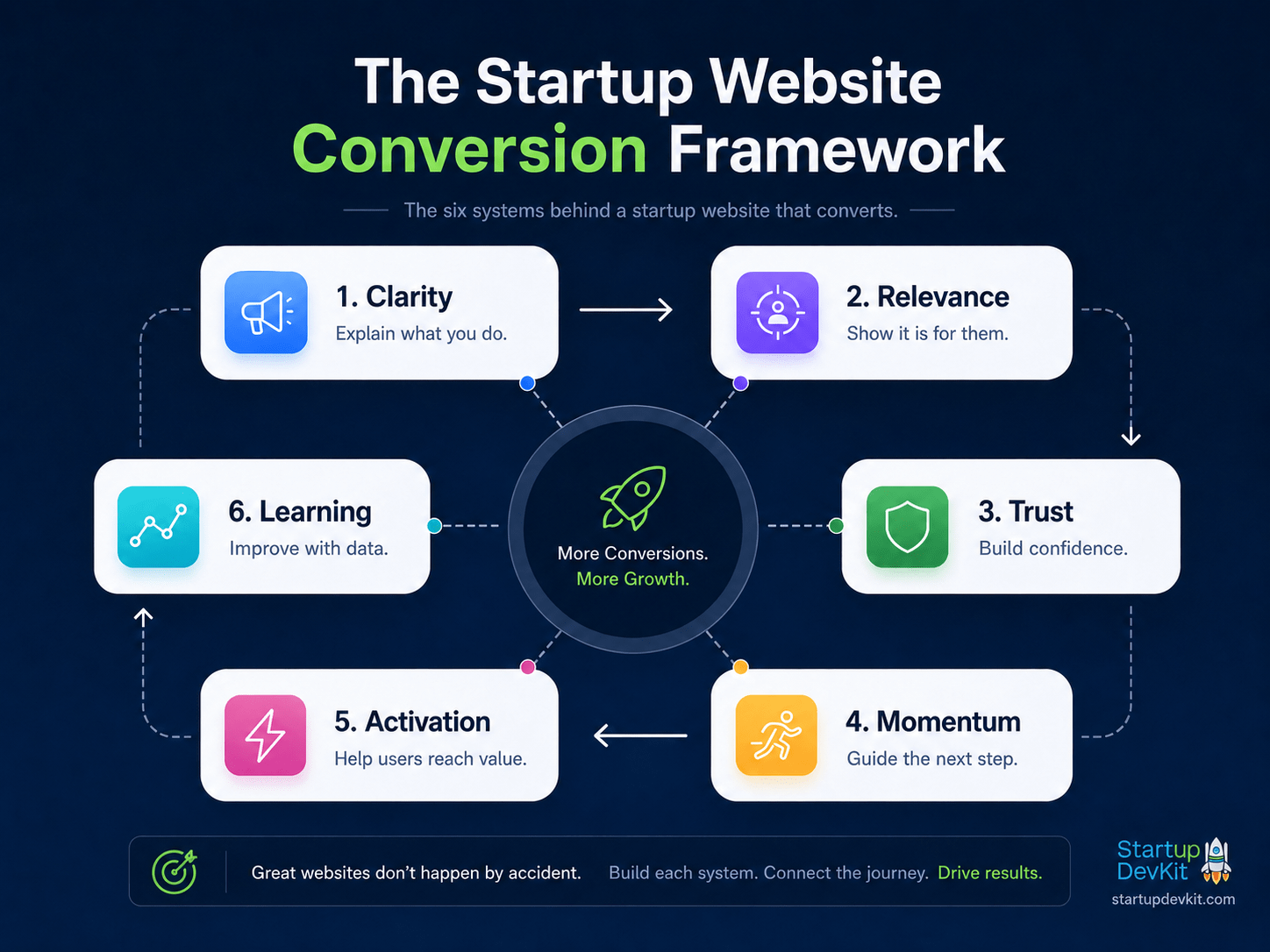
The six elements that turn a startup website into a real conversion system.
Clarity
Clarity means visitors can quickly understand what you do.
Your homepage should not force people to decode clever language, vague taglines, or abstract positioning.
A clear website tells visitors:
- what the product is
- who it is for
- what outcome it helps create
- why it is worth exploring
If people cannot understand your startup in a few seconds, the rest of the page has to work much harder.
Relevance
Relevance means the visitor can tell that your offer applies to them.
A founder at the idea stage, a startup with an MVP, a growth-stage SaaS company, and an enterprise buyer may all need different messages.
You do not always need separate pages for every audience, but you should make it easy for visitors to recognize where they fit.
Start with validated customer profiles and buyer personas.
This can be done through use cases, plan descriptions, audience-specific sections, customer paths, industry pages, or simple copy that names the people you serve.
Trust
Trust is what makes a visitor feel safe enough to continue.
You can build trust from:
- testimonials
- customer logos
- case studies
- founder credibility
- product screenshots
- press mentions
- security information
- transparent pricing
- clear support options
- helpful content
- clean design
For early-stage startups without much social proof, trust can also come from clarity, depth, generosity, and strong founder insight.
A useful article, a detailed product walkthrough, or an honest explanation of who your product is and is not for can all build trust.
Momentum
Momentum means the site keeps moving visitors toward action.
Every important page should have a next step.
That does not mean every section should scream “Buy now.”
It means the page should guide visitors naturally.
For example:
- A homepage might lead to a product page, pricing page, free trial, or lead magnet.
- A product page might lead to a pricing page or demo.
- A blog post might lead to a related guide, checklist, free account, or membership plan.
- A pricing page might lead to checkout, a free trial, or a demo request.
Avoid dead ends. If someone is interested, give them a clear path forward.
Activation
Conversion does not end at signup.
If your startup offers a platform, SaaS product, course, membership, marketplace, or app, your website should set up the user for activation.
Activation is the moment when a user experiences meaningful value.
That might mean:
- generating their first roadmap
- creating their first project
- completing onboarding
- using a template
- importing data
- booking a session
- making their first purchase
Your public website should not overpromise. It should prepare the visitor for what happens after they join and help them take the first meaningful step.
Learning
A startup website should improve over time.
You should track what people do, where they click, which pages drive signups, where visitors drop off, and which CTAs perform best.
At minimum, you should know:
- how many people visit important pages
- which CTAs are clicked
- which traffic sources convert
- which blog posts drive signups
- where checkout or signup abandonment happens
- which pages create the most engaged users
Your website is not something you finish once.
It is something you keep improving based on evidence.
Before You Design: Define the Visitor Journey
Before designing your homepage, product pages, pricing page, or navigation, think about the journey your visitor is on.
A visitor may be:
- just discovering the problem
- researching possible solutions
- comparing vendors
- looking for pricing
- trying to understand if your product is credible
- ready to buy
- not ready to buy, but willing to subscribe or download something useful
Each visitor stage needs a different level of information.
Someone who is:
- problem-aware may need education.
- solution-aware may need product details.
- comparison-shopping may need pricing, testimonials, FAQs, and risk reducers.
- ready to act needs a clear CTA and a low-friction path.
This is why your website should not rely on one page to do everything.
- The homepage creates orientation.
- Product pages explain the offer.
- Pricing pages support the buying decision.
- Blog posts educate and attract search traffic.
- Lead magnets capture lower-intent visitors.
- Onboarding pages and emails help convert new users into activated users.
When these pieces work together, your website becomes a conversion system.
The Ideal Startup Homepage Structure
Your homepage is often the most important page on your website.
It is usually where people go to understand the big picture.
A good startup homepage should not overwhelm visitors with every detail. Instead, it should give them enough clarity and confidence to keep moving.
Here is a strong homepage structure for most startups.
1. Hero Section
The hero section is the first major section visitors see.
It should clearly communicate your core value proposition.
A strong hero section usually includes:
- a clear headline
- a supporting subheadline
- one primary CTA
- one secondary CTA if needed
- a product image, visual, short video, or graphic
- a short trust signal if available
Example: A strong homepage hero section should make the value proposition, next step, and visual focus immediately clear.
In the example below, the hero is structured around eight essential elements and uses Z-pattern flow to guide visitors from the brand to the message, then toward action and trust-building signals.
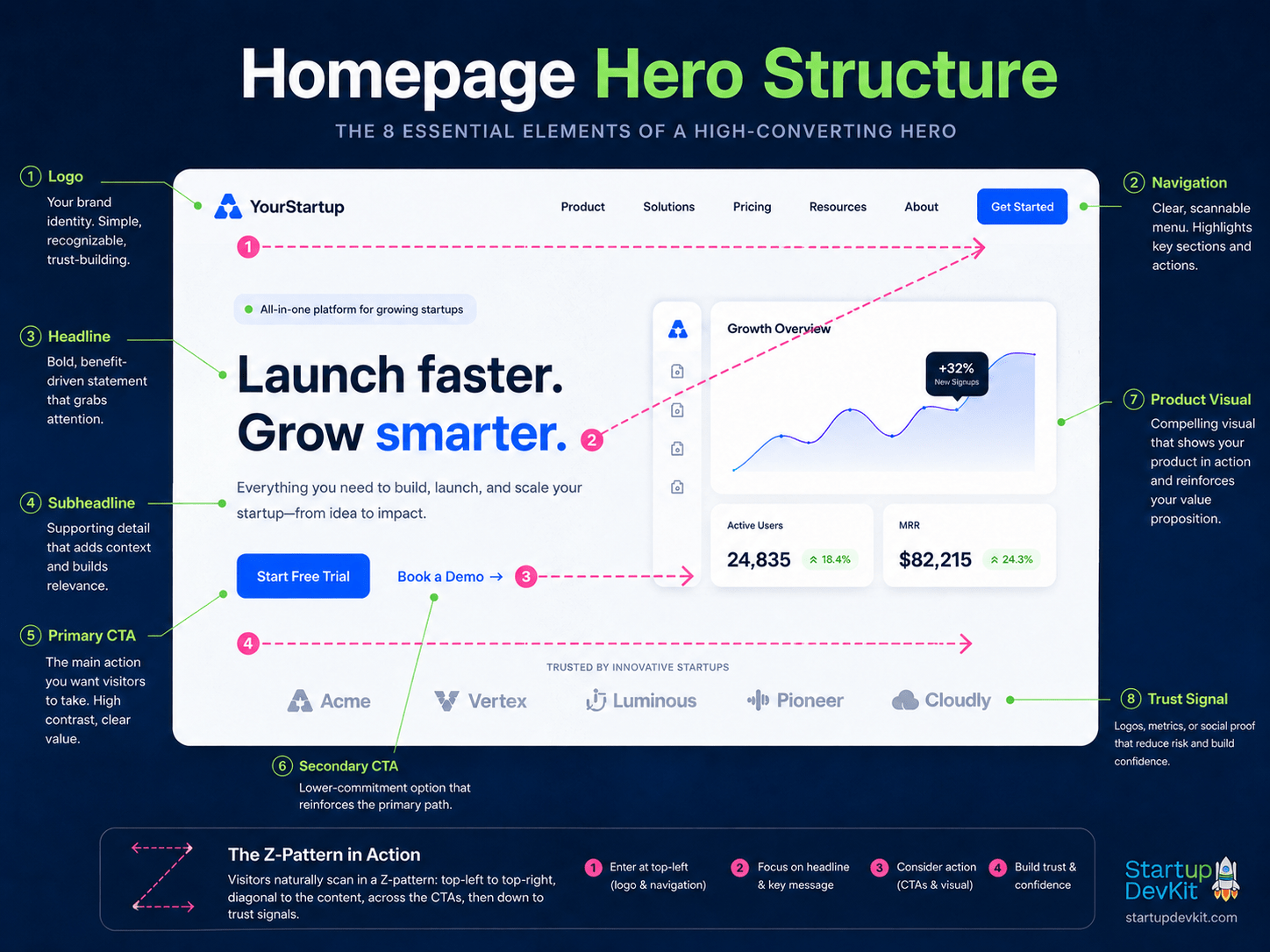
A high-converting homepage hero should guide attention clearly, combining strong messaging, CTAs, visuals, and trust signals in a simple Z-pattern flow.
The headline should make the value obvious.
Avoid vague language like:
The future of business is here.
Revolutionizing the way teams work.
Empowering innovation at scale.
Those phrases may sound polished, but they do not say enough.
A better headline is specific:
Build a clear startup roadmap before you waste months moving in the wrong direction.
Turn customer feedback into product decisions your team can actually execute.
Launch your first investor-ready financial model without starting from a blank spreadsheet.
The visitor should understand what you help them do.
Visual Guidance for the Hero Section
The hero section should visually tell the visitor where to look first.
For many startup websites, a strong hero uses a Z-pattern layout:
- top-left: logo
- top-right: navigation or CTA
- center-left: headline, subheadline, and CTA
- center-right: product visual, founder visual, dashboard screenshot, conceptual graphic, or short video
The Z-pattern works well because visitors often scan the top of a page from left to right, then diagonally down toward the main message and CTA.
Your hero should also include enough whitespace so the headline, CTA, and visual are not fighting for attention.
A crowded hero section makes the visitor work harder.
A clear hero section creates immediate orientation.
Using Video in the Hero Section
Videos can work very well in the hero section when your product is new, complex, visual, or easier to understand through motion.
A short 30 to 90 second video can help explain:
- what the product does
- who it is for
- what problem it solves
- what the user sees after signing up
- why the product is different
However, video should support the copy, not replace it.
The page should still make sense even if the visitor never presses play.
2. Problem Section
After the hero, explain the problem.
This section should show that you understand the visitor’s pain.
For example:
Founders often do not struggle because they lack ideas. They struggle because they are trying to validate, build, market, and fund those ideas without a clear operating system.
Or:
Most early-stage teams do not have a traffic problem first. They have a clarity problem. Their website does not explain the offer well enough for the right visitors to take action.
The problem section should create recognition.
The visitor should think:
Yes, that is exactly what I am dealing with.
Visual Guidance for the Problem Section
The problem section often works better when it uses visuals to make the pain easier to understand.
You can use:
- pain-point cards
- before-and-after comparisons
- icons for major problems
- a messy workflow diagram
- a quote from a customer or target user
- a side-by-side contrast between the current state and desired state
For example, a startup strategy product might show:
Before: scattered ideas, unclear priorities, disconnected tools, no roadmap.
After: clarified model, focused priorities, structured roadmap, execution path.
This kind of visual contrast helps the visitor quickly understand why the problem matters.
3. Outcome and Value Proposition Section
Once the problem is clear, show the desired outcome.
This section should explain what life looks like after using your product or service.
Do not only list what the product does.
Explain what the visitor can accomplish.
Examples:
- clarify your audience
- structure your offer
- build a stronger landing page
- generate a roadmap
- reduce guesswork
- launch faster
- make better decisions
- avoid wasting time on the wrong priorities
This section bridges the gap between the problem and your solution.
Visual Guidance for the Outcome Section
Outcome sections often work well with clean, aspirational visuals.
You can use:
- benefit cards
- outcome icons
- dashboard previews
- progress graphics
- from-this-to-this layouts
- simple diagrams showing the transformation
The goal is to make the future state feel more concrete.
Your visuals should help the visitor imagine progress.
4. How It Works
The “How It Works” section should explain the process simply.
Three to five steps is usually enough.
For example:
- Create your account.
- Answer a few guided questions.
- Generate your roadmap.
- Use templates and resources to execute.
- Track progress and refine your strategy.
This gives visitors confidence because they can imagine themselves using the product.
If your product is complex, your explanation should be even simpler.
Complexity should live inside the product, not in the first explanation of the product.
Visual Guidance for the How-It-Works Section
This section is often much easier to understand when it is visual.
Useful formats include:
- numbered cards
- horizontal step flows
- vertical timelines
- icons for each step
- process diagrams
- screenshots paired with each step
- short looping clips
- animated walkthroughs
For mobile, vertical step layouts usually work better than horizontal ones.
The visitor should be able to scan the section and understand the process without reading every sentence.
5. Product or Service Walkthrough
Your homepage should include a short product walkthrough or preview.
This can include:
- screenshots
- feature cards
- short video
- example output
- sample dashboard
- before-and-after comparison
- process graphic
For AI products, this is especially important.
Many startups now claim to use AI. Visitors are more skeptical. They want to know what the AI actually does, what the user controls, and what the output looks like.
That means you should show:
- the workflow
- the input
- the output
- the result
Using Video in Product Walkthroughs
Video can be especially helpful in product walkthrough sections.
You can use:
- a short product demo
- a founder walkthrough
- a screen recording
- a use-case-specific demo
- a quick “see it in action” clip
This is useful when the product is easier to understand by watching it work.
But keep the video focused.
A homepage video should usually explain the product quickly, not become a long training session.
6. Use Cases or Customer Paths
A use-case section helps different types of visitors find themselves on the page.
For example, a startup platform might have paths like:
- validate a startup idea
- build an MVP
- improve your go-to-market strategy
- prepare for fundraising
- create a stronger pricing page
- find better startup tools
For a SaaS product, use cases may be organized by role, team, industry, or job to be done.
This section is useful because not every visitor has the same intent.
Visual Guidance for Use Cases
Use cases work well as cards, tiles, or segmented paths.
Each card should include:
- the audience or job to be done
- the problem
- the outcome
- a relevant icon or visual
- a CTA or link to learn more
Do not make all use cases look equally dense.
Use visual hierarchy to help visitors quickly find the path that matches them.
7. Social Proof
Social proof helps visitors trust that your product or company can deliver.
This can include:
- testimonials
- customer logos
- founder quotes
- case studies
- user results
- press mentions
- ratings or reviews
- partner logos
- community size
- usage numbers
If you do not have much social proof yet, use other trust builders.
For example:
- founder expertise
- detailed product explanation
- transparent roadmap
- helpful educational content
- screenshots
- examples
- clear terms
- honest positioning
Early-stage startups should not fake credibility.
They should build trust through clarity and usefulness.
Visual Guidance for Social Proof
Social proof should be easy to scan.
You can use:
- testimonial cards
- headshots
- company logos
- quote blocks
- result callouts
- case study previews
- press logos
- short video testimonials
If using testimonials, make sure they are visually separated from the rest of the page so they stand out.
A testimonial buried in a dense paragraph will not have the same impact as one placed in a well-designed card or quote section.
Example: Many startup homepages also function as landing pages, especially when they are built around one clear conversion goal. Instead of treating each section as a separate block, it helps to think about the page as a guided flow that moves visitors from first impression to informed action.
The infographic below shows one practical example of startup website structure for a high-converting landing page. It moves from the primary outcome and value proposition into feature-benefit clarity, product visuals, use cases, social proof, FAQs, and a final CTA.
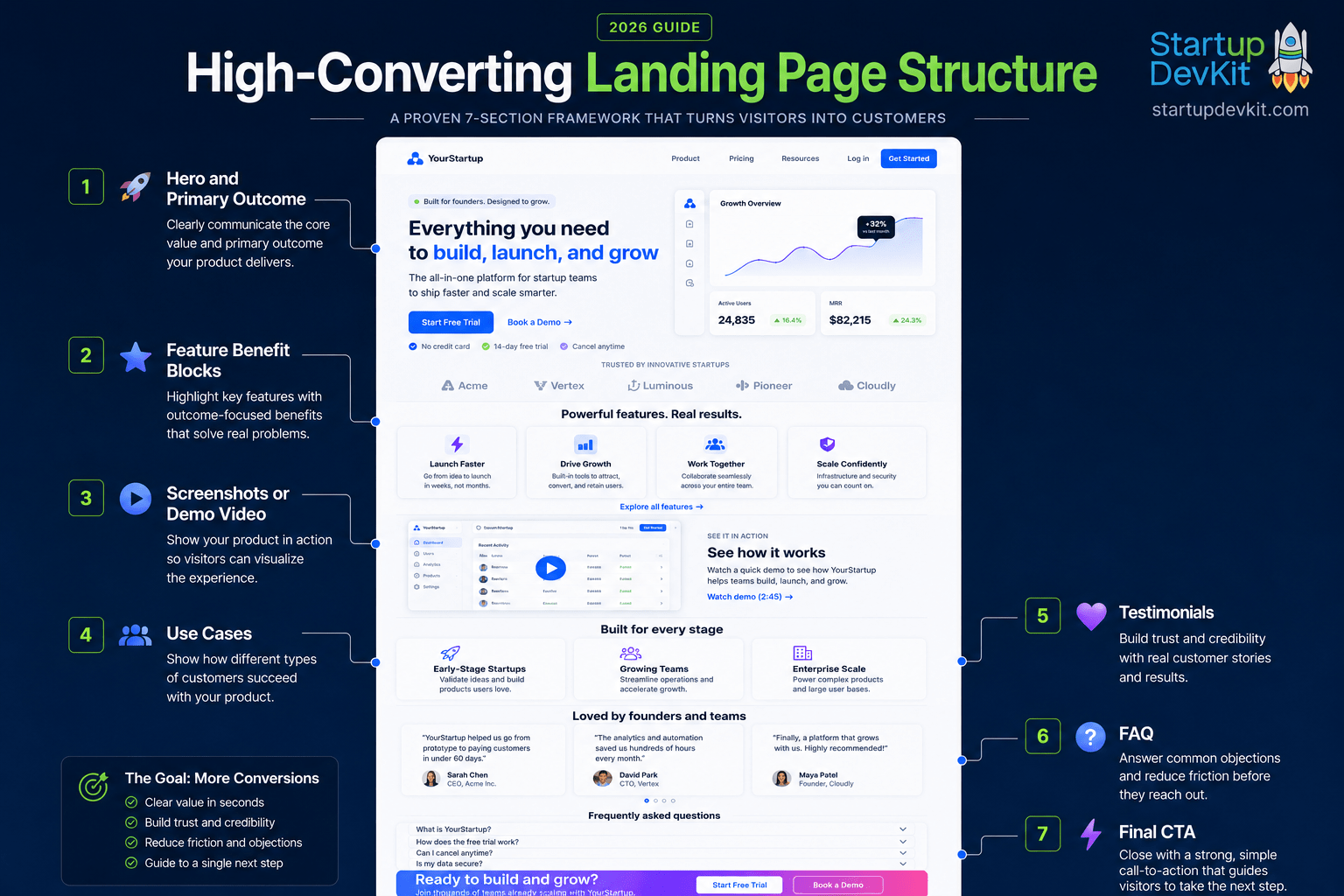
A high-converting landing page works as a structured flow, helping visitors understand the offer, build confidence, and reach the next step with less friction.
This structure works because it follows the way visitors often evaluate a new product, platform, or offer. They first want to know what the page is about and why it matters. Then they want to understand what the product does, see evidence that it works, determine whether it fits their situation, and resolve any concerns before taking the next step.
The hero and primary outcome section creates the first impression. It should quickly communicate who the offer is for, what outcome it helps create, and what action the visitor should take next.
The feature-benefit blocks explain what the product or offer includes, but they should not stop at features. Each feature should connect to a practical benefit, outcome, or problem the visitor cares about.
The screenshots or demo video section makes the offer more concrete. This is especially useful for software, platforms, AI tools, dashboards, marketplaces, and membership products because it helps visitors see what they will actually experience.
The use cases section helps different visitors recognize where they fit. Instead of assuming every visitor has the same need, this section can show how the offer applies to different stages, roles, industries, or jobs to be done.
The testimonials section builds trust by showing that real people have used, valued, or benefited from the product. If a startup does not have testimonials yet, this section can be supported with founder credibility, product examples, case studies, data points, or early user feedback.
The FAQ section handles objections before they stop the visitor from acting. This is where you can answer questions about pricing, fit, onboarding, cancellation, support, technical requirements, or what happens after signup.
The final CTA closes the page with a clear next step. By this point, the visitor should understand the offer, see why it matters, and know exactly what to do next.
Not every startup homepage or landing page needs to follow this exact sequence, but the principle is important: the page should move from clarity to confidence to action. That is what makes the structure feel intentional instead of scattered.
8. Pricing or Plan Preview
If pricing is public, consider adding a short pricing preview on the homepage.
This does not need to show every detail.
It can simply explain the main options and link to the full pricing page.
For example:
- explore for free
- join as a solo founder
- choose a team plan
- request enterprise access
This helps visitors understand whether your product is accessible and whether it fits their needs.
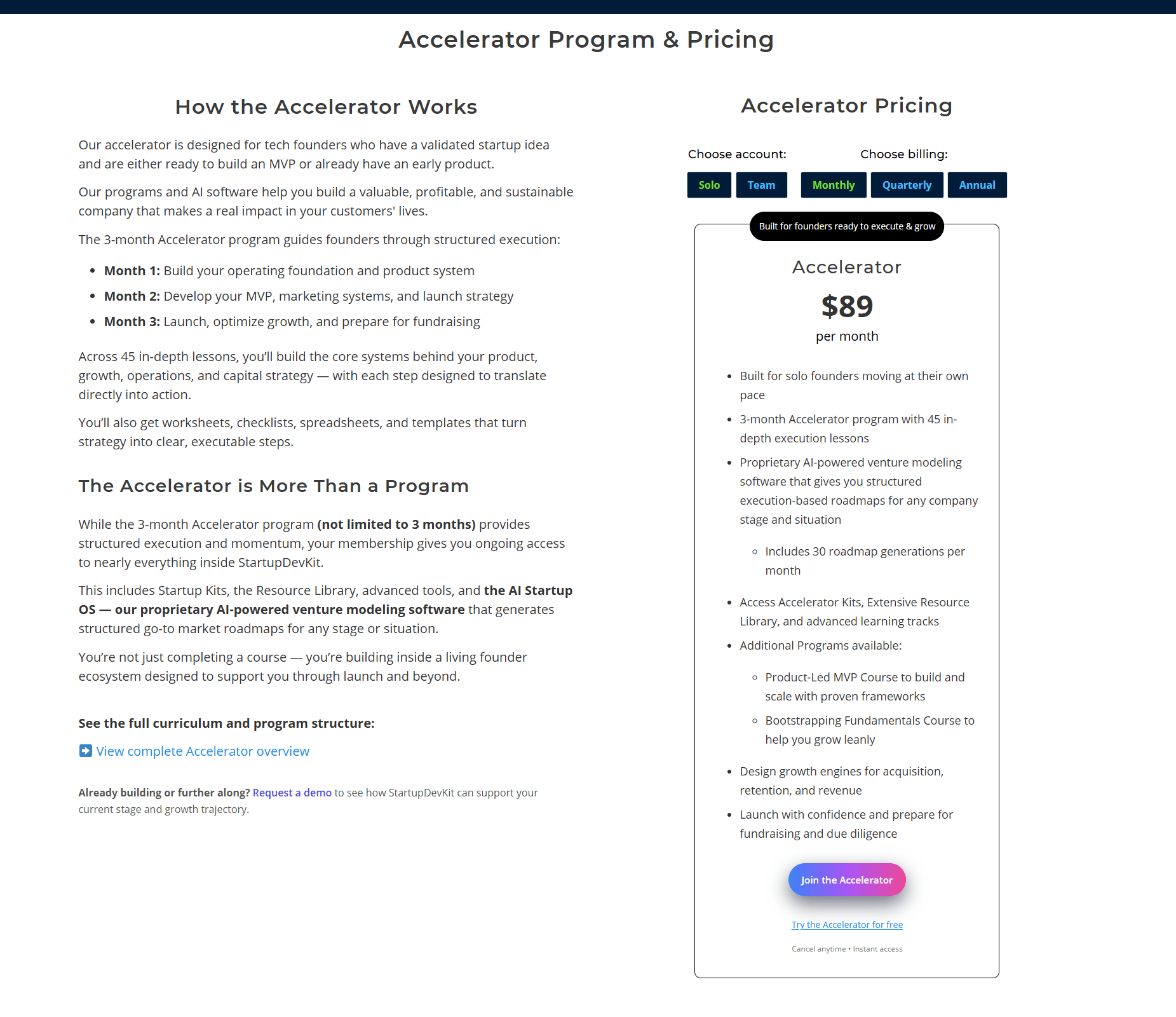
Example: A strong pricing section does more than display a dollar amount. It helps visitors understand which option fits their situation, what they’ll get, and what step to take next.
In the example below, the pricing layout combines account selection, billing frequency, benefit clarity, and both primary and lower-friction conversion paths.
Visual Guidance for Pricing Previews
A homepage pricing preview should be simple.
Do not recreate the entire pricing page on the homepage.
Instead, use:
- two to four simple cards
- a short plan summary
- one clear CTA
- a view-full-plans link
- a short risk reducer
For example:
Start free. Upgrade when you need more access.
Or:
View plans for solo founders and teams.
The visual goal is to make pricing feel approachable, not overwhelming.
9. Risk Reducers
Risk reducers help visitors feel safer taking action.
Examples include:
- free trial
- freemium plan
- no credit card required
- cancel anytime
- money-back guarantee
- secure checkout
- transparent pricing
- clear onboarding
- support availability
- sample previews
- FAQ section
The more commitment you ask for, the more risk reducers you need.
A free newsletter signup needs very little risk reduction.
A paid annual membership needs more.
An enterprise demo request may need proof, examples, and trust signals before the form.
Visual Guidance for Risk Reducers
Risk reducers should appear near important CTAs.
You can place them:
- below buttons
- near pricing cards
- beside signup forms
- above checkout buttons
- inside FAQ sections
- in small trust bars
Keep them short and easy to read.
Examples:
- No credit card required.
- Cancel anytime.
- Instant access.
- Secure checkout.
- Start free.
These small details can reduce hesitation at the exact moment someone is deciding whether to act.
10. FAQ and Objection Handling
Your homepage does not need a giant FAQ, but it should handle the most common objections.
For example:
- Who is this for?
- What happens after I sign up?
- Can I cancel?
- Is there a free plan?
- Do I need technical experience?
- How is this different from other tools?
- What if I already have a product?
- What if I am still at the idea stage?
FAQs are not filler.
They are conversion tools.
They help remove hesitation before it stops the visitor from acting.
Visual Guidance for FAQs
FAQ sections often work well as accordions because they keep the page clean while still making answers available.
Good FAQ design should include:
- clear question text
- short answers
- enough spacing between questions
- readable font size
- mobile-friendly tap targets
- no overly clever labels
The visitor should be able to scan the questions and quickly find the one that matches their concern.
11. Final Call to Action
End the homepage with a clear CTA.
Do not let the page fade out.
The final section should summarize the main value and give the visitor a next step.
For example:
Ready to build your startup with more clarity?
View the plans and choose the path that fits your stage.
Or:
Start with a free account, explore the platform, and build your first roadmap.
A strong final CTA gives the visitor a clear reason to continue.
Visual Guidance for the Final CTA
The final CTA section should feel distinct from the rest of the page.
You can use:
- a gradient background
- a contrasting color block
- a simple card
- a product visual
- a short founder message
- a bold headline
- one strong button
Do not overload the final CTA with too many choices.
At this point, the visitor should know what to do next.
How to Structure Product Pages That Convert
A startup homepage should quickly explain what your company does, who it helps, and why visitors should care.
But your product page has a different job.
Your product page should help a serious visitor understand the actual offer.
This is where you go deeper into the product, service, platform, tool, course, membership, marketplace, or solution you are selling.
The goal is not just to describe features.
The goal is to connect those features to the outcomes your target customer wants.
A strong product page should answer questions like:
- What does this product help me do?
- Who is it built for?
- What problem does it solve?
- How does it work?
- What do I get access to?
- What makes it different?
- What happens after I sign up?
- Why should I trust this company?
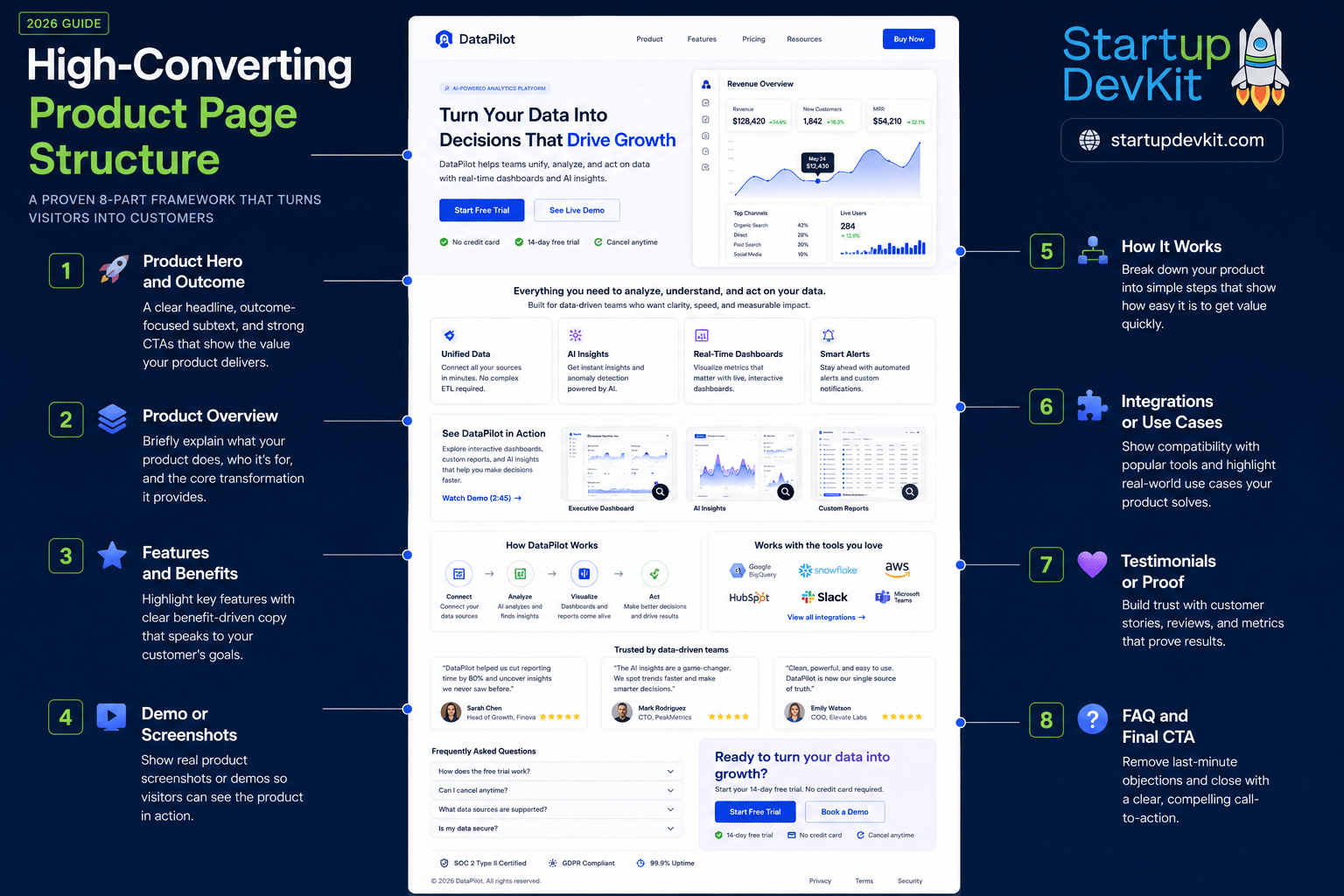
A strong product page connects the main outcome, feature explanations, proof, and next steps in one clear flow.
Start With the Primary Outcome
The top of your product page should not begin with a long technical explanation.
Start with the main outcome your target customer wants.
Instead of saying:
Our platform includes templates, tools, dashboards, resources, and workflows.
You could say:
Build a clearer, stronger, and more actionable startup strategy before you waste months moving in the wrong direction.
That type of message gives the visitor a reason to keep reading.
After the outcome is clear, you can explain the product details.
Visual Guidance for Product Page Heroes
A product page hero should usually include a product-specific visual.
This can be:
- a screenshot
- a dashboard preview
- an example output
- a short demo video
- an annotated interface image
- a visual representation of the product workflow
The homepage hero can be broader.
The product page hero should be more concrete.
Visitors should immediately understand what they are looking at and how the product creates value.
Explain What the Product Includes
Once the visitor understands the value, show them what they actually get.
Depending on the type of startup, this section may include:
- core features
- tools or dashboards
- templates or downloads
- courses, lessons, or learning paths
- community access
- reports, roadmaps, or recommendations
- integrations
- support options
- usage limits or plan-based access
Avoid turning this into a wall of features.
Group related features into categories so the visitor can understand the product quickly.
A good product page does not make people work hard to understand what they are buying.
Visual Guidance for Feature Sections
Feature sections often work well with alternating layouts.
For example:
- text on the left, screenshot on the right
- screenshot on the left, text on the right
- feature cards in a grid
- tabs for related feature groups
- icons for quick scanning
- annotated product images
This creates visual rhythm and keeps the page from feeling repetitive.
However, do not alternate layouts just to look fancy.
Use each layout to clarify the product.
Connect Features to Benefits
Features tell people what your product has.
Benefits tell people why those features matter.
For example:
Feature: AI-powered roadmap generation
Benefit: Helps founders turn scattered startup ideas into a structured execution plan.
Feature: Resource library
Benefit: Gives founders practical references, tools, and frameworks they can use while building.
Feature: Startup templates
Benefit: Saves time by giving founders a starting point instead of making them create everything from scratch.
This is especially important for startups because early visitors may not fully understand your product category yet.
You may need to educate them while you sell.
Visual Guidance for Feature-Benefit Pairing
A strong product page should visually connect each feature to the outcome it creates.
You can use:
- two-column layouts
- feature-to-benefit cards
- icons beside each benefit
- screenshots paired with explanations
- mini case examples
- before-and-after states
The visual structure should help visitors see the relationship between what the product does and why it matters.
Show the Product in Context
If you have screenshots, product videos, walkthroughs, example outputs, sample dashboards, or use-case visuals, include them.
Visitors should not have to imagine how your product works.
For:
- software startups, show the interface.
- service startups, show the process.
- course or membership startups, show what members get.
- marketplaces, show both sides of the marketplace.
- AI products, show examples of the input, output, and workflow.
- This is especially important because many visitors are skeptical of vague AI claims.
If your product uses AI, show what the AI actually helps the user accomplish.
Using Video on Product Pages
Product pages are one of the best places to use video.
Useful product page videos include:
- a full product walkthrough
- a feature-specific demo
- a founder explanation
- a customer use-case video
- a short “how this works” video
- an onboarding preview
A product video should reduce uncertainty.
After watching it, the visitor should better understand:
- what the product does
- whether it fits them
- what the experience feels like
- what value they can expect
Video can be especially powerful for new product categories, AI tools, dashboards, complex workflows, and platforms with multiple features.
Use Product Pages to Segment Visitor Intent
Not every visitor is looking for the same thing.
Some people want a quick overview.
Some want detailed features.
Others want pricing.
Some want proof.
And some want to know whether the product is right for their specific use case.
A strong product page can serve these different levels of intent by including:
- a short overview near the top
- deeper feature sections below
- use-case sections
- FAQs
- screenshots
- testimonials
- pricing links
- clear CTAs
This lets visitors choose how deeply they want to explore.
Use AI to Draft and Improve Product Pages
AI can help you create a stronger product page faster, but only if you give it specific context.
You can use AI to:
- turn product features into benefit-driven copy
- create product page outlines for different customer segments
- rewrite technical explanations in simpler language
- generate FAQ questions from likely customer objections
- create comparison tables between plans, features, or use cases
- suggest stronger calls to action based on visitor intent
- analyze whether the page is too vague, too long, or missing trust signals
A useful AI prompt:
I am creating a product page for [product]. It helps [target customer] achieve [main outcome] by providing [features]. Rewrite this into a conversion-focused product page structure with a hero section, problem section, feature-benefit sections, trust signals, objections, FAQ, and CTA sections.
AI can help speed up the process, but the founder still needs to provide the strategy.
The best product pages come from real customer insight, not generic copy.
End With the Next Best Action
Every product page should end with a clear next step.
Depending on your business model, that CTA might be:
- start free
- join the platform
- view plans
- book a demo
- download a sample
- try the tool
- create an account
- request access
If the visitor is not ready to buy, give them a lower-friction option, such as joining your email list, downloading a guide, reading a related article, or viewing a comparison page.
The goal is to avoid dead ends.
How to Structure Pricing Pages That Convert
Your pricing page is one of the most important pages on your startup website.
By the time someone visits your pricing page, they are usually comparing options, evaluating risk, checking affordability, or trying to understand whether your product is worth the commitment.
A weak pricing page creates confusion.
A strong pricing page helps people make a confident decision.
Make the Plans Easy to Compare
If you offer multiple plans, visitors should be able to understand the differences quickly.
Avoid making every plan sound equally important.
Each plan should have a clear purpose.
For example:
- Free or Lite plan: for exploring the platform
- Starter plan: for individuals who need the core product
- Growth plan: for users who need more access or support
- Team plan: for collaboration
- Enterprise plan: for larger organizations with custom needs
If every plan is described with the same vague language, visitors will struggle to choose.
Your job is to help them self-select.
Highlight the Best-Fit Plan
Many pricing pages highlight a “most popular” or “best value” plan.
This can work well, but only if it is honest and useful.
The highlighted plan should usually represent the best balance of value, access, and price for your ideal customer.
You can label it with something like:
- Best for Solo Founders
- Best Value
- Most Popular
- Recommended for Teams
- Best for Validating an Idea
- Best for Building and Launching
The label should help the visitor make a decision, not just push them toward the most expensive option.
Reduce Pricing Page Friction
Pricing pages often fail because they introduce unnecessary uncertainty.
Common pricing page problems include:
- unclear plan differences
- no explanation of who each plan is for
- hidden pricing
- too many choices
- confusing feature tables
- no FAQ section
- no refund or cancellation information
- no trust signals
- no clear CTA buttons
- no explanation of what happens after signup
The pricing page should make the decision feel easier, not harder.
Explain Who Each Plan Is For
Visitors should not have to guess which plan fits them.
Add short plan descriptions that clarify the intended user.
For example:
The Lite plan is best for founders who want to explore the platform and access a limited set of startup tools.
The Incubator plan is best for founders who are validating an idea and building a stronger foundation before going all in.
The Accelerator plan is best for founders who are building, launching, marketing, or scaling a product or service.
The Premium plan is best for founders who want broader access across multiple startup-building paths.
That type of explanation helps visitors understand where they belong.
It also reduces the chance that someone chooses the wrong plan and has a poor experience.
Visual Guidance for Pricing Pages
Pricing pages need visual clarity.
The design should reduce decision fatigue.
Helpful visual choices include:
- pricing cards with clear hierarchy
- one highlighted best-fit plan
- consistent feature rows
- badges like “Best for Solo Founders” or “Best Value”
- monthly and annual toggles
- solo and team toggles
- comparison tables
- FAQ accordions below the cards
- trust signals near CTA buttons
- enough spacing between plan sections
A pricing page should not feel like a spreadsheet dumped onto a website.
It should guide the visitor toward the right choice.
Spacing Matters on Pricing Pages
Pricing pages often contain a lot of information.
That makes spacing especially important.
Use spacing to separate:
- plan cards
- feature groups
- pricing toggles
- FAQs
- trust signals
- CTA buttons
- comparison tables
When a pricing page is too cramped, the decision feels harder.
When the pricing page has enough breathing room, visitors can compare options more comfortably.
Include a Pricing FAQ
A pricing FAQ can handle objections before they stop a visitor from buying.
Good pricing FAQ questions include:
- Can I cancel anytime?
- Is there a free trial?
- Do I need a credit card to start?
- What happens after I sign up?
- Can I upgrade later?
- Can I switch plans?
- What is included in each plan?
- Is this for solo users or teams?
- Do you offer annual pricing?
- Do you offer support?
The FAQ is also a good place to explain anything that might be too detailed for the pricing cards themselves.
Show What Happens After Signup
This is a simple section many startups forget.
Visitors may be wondering:
- Will I get instant access?
- Will I receive onboarding emails?
- Will I need to install anything?
- Will I be able to use the product immediately?
- Will someone contact me?
A short “What happens after you join?” section can reduce hesitation and improve conversions.
For example:
After you sign up, you’ll get immediate access to your dashboard, onboarding guidance, and the resources included in your plan. You can start exploring the platform right away and upgrade later if you need more access.
Use AI to Improve Pricing Page Copy
AI can be especially useful for pricing page optimization because pricing pages require clear positioning, objection handling, and concise plan differentiation.
You can use AI to:
- rewrite plan descriptions so each plan has a clearer audience
- create comparison tables
- generate pricing FAQ questions
- identify confusing plan language
- suggest better CTA button text
- create plan labels based on customer segments
- summarize the value of annual plans without sounding pushy
- generate objection-handling copy for cancellation, refunds, support, and access limits
A useful AI prompt:
Review this pricing page copy. Identify anything confusing, vague, repetitive, or likely to create hesitation. Then rewrite the plan descriptions so each plan clearly communicates who it is for, what the user gets, and why they should choose it.
Link Pricing Pages From the Right Places
Your pricing page should be easy to find, but it should also appear at the right moments in the visitor journey.
Good places to link to your pricing page include:
- main navigation
- homepage CTA sections
- product pages
- feature pages
- FAQ pages
- blog posts with buying intent
- comparison pages
- email nurture sequences
For example, if you are building a startup and want to compare different StartupDevKit membership options, you can view the available plans on the StartupDevKit membership plans page:
View StartupDevKit membership plans
Add Pricing Page Conversion Tracking
A pricing page should not just exist.
It should be measured.
At minimum, track:
- pricing page visits
- plan CTA clicks
- monthly vs annual toggle clicks
- solo vs team toggle clicks
- FAQ opens
- checkout starts
- checkout completions
- abandoned checkouts
This gives you real data about where people hesitate.
If many people visit pricing but few click a plan, the offer may be unclear.
If many people click a plan but do not complete checkout, the checkout process may have too much friction.
And if annual plan clicks are low, the savings or value framing may not be strong enough.
The goal is not to guess forever.
The goal is to learn from visitor behavior and improve the page over time.
Essential Website Pages for Startups
Your homepage, product pages, and pricing page are extremely important, but they should not be the only pages on your site.
A startup website usually needs several supporting pages to build trust, educate visitors, and guide people through different levels of intent.
Home
Your homepage should be easy to access from the main navigation.
This is basic, but it matters.
Many visitors will use your homepage as a reset point when they want to understand your startup from the top.
About
An About page helps humanize your company.
This page should explain:
- why the company exists
- who is behind it
- what problem you are solving
- why your team is credible
- how your story connects to the customer
For early-stage startups, the About page can be especially useful because people may not know your brand yet.
Founder story matters.
Your mission matters.
Your insight into the problem matters.
Do not make the About page only about you. Connect your story back to the customer and the problem you are solving.
Product, Features, or Platform Page
If your startup sells software, a platform, a tool, a membership, a course, a service, or any other structured offer, you should have a dedicated product or features page.
This page should explain what the visitor gets, how it works, and why it matters.
If your homepage is the overview, your product page is the deeper explanation.
Pricing
Your pricing page should be easy to find if your business model supports public pricing.
Pricing transparency can reduce friction and help visitors decide whether your offer fits their budget.
For some enterprise or custom solutions, pricing may require a conversation. But even then, you can often provide pricing guidance, starting ranges, package types, or clear explanations of what affects price.
Avoid making people contact you just to learn whether your offer is even remotely affordable.
Use Cases
Use-case pages are useful when your product serves multiple audiences, industries, or jobs to be done.
For example:
- for solo founders
- for startup teams
- for agencies
- for investors
- for universities
- for SaaS startups
- for ecommerce brands
- for marketplaces
Use-case pages help visitors understand how your product applies to their situation.
They can also be useful for SEO when each use case reflects real search intent.
FAQ
A FAQ page is one of the easiest ways to remove friction.
You can use it to answer questions about pricing, access, support, product fit, onboarding, cancellation, refunds, technical requirements, and what happens after signup.
A good FAQ page is not just customer support content.
It is conversion content.
It handles objections before they stop someone from taking action.
Blog or Resource Hub
A blog or resource hub can help your startup attract search traffic, educate prospects, and build authority.
However, having a blog is also a responsibility.
Publishing weak content will not do much for your business.
Your blog should help your target audience solve real problems.
It should also connect naturally to your product, lead magnets, email list, or membership path.
If you want to improve your startup’s search visibility, you can also review this SEO checklist for startups:
Contact
A contact page gives potential customers, partners, press, and others a way to reach you.
Keep the form simple.
Use clear labels.
Add spam protection.
Let people know what kind of response they can expect.
If you serve multiple types of inquiries, consider using a dropdown field so people can identify whether they need support, partnerships, press, sales, or general help.
Login and Signup
If your startup has a platform, app, membership, or customer dashboard, login and signup links should be easy to find.
Most sites place these in the upper-right area of the navigation.
For mobile, make sure these links remain visible and easy to tap.
A hidden signup path can quietly hurt conversions.
Visual Structure: How Design Guides Attention and Conversions
Design is not separate from conversion.
It is how you guide attention.
Your copy explains the message, but your visual structure determines how easily visitors notice, process, and act on that message.
A startup website should use visuals, layout, spacing, color, gradients, images, and video to support the visitor journey.
Good design makes the page feel easier to understand.
Bad design makes even good copy feel harder to trust.
Example: Website visitors do not read every page from top to bottom with equal attention. They scan for structure, relevance, and visual cues that help them decide where to focus.
The infographic below shows several useful visual structure patterns that can help startup websites guide attention more effectively. These patterns are not rigid rules, but they are helpful frameworks for organizing content so visitors can understand the page faster and move toward the next action with less friction.
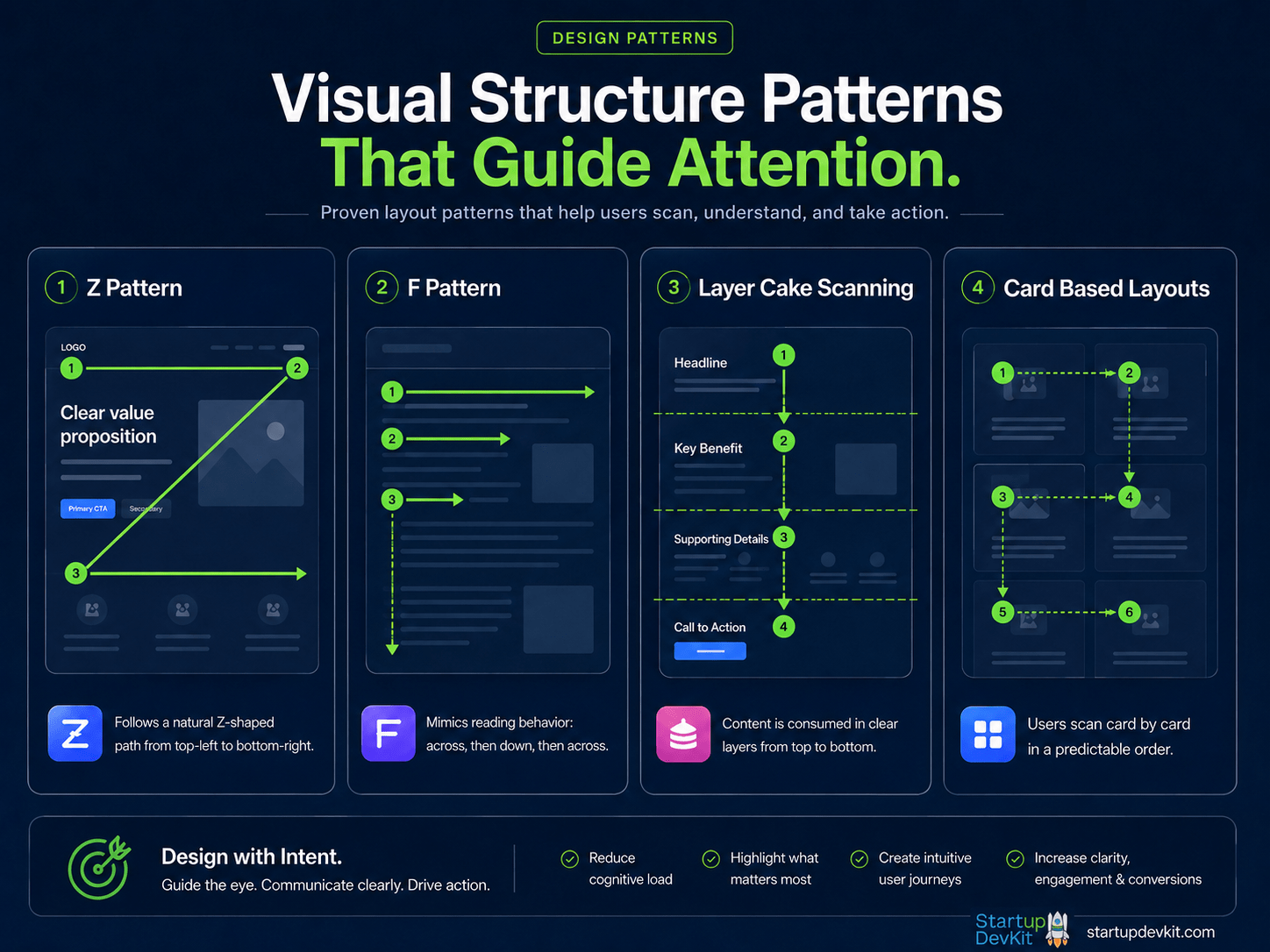
Visual structure patterns help visitors scan pages, understand information hierarchy, and find the next action more easily.
Each pattern is useful in a different situation. A Z-pattern can work well for simple landing page sections or hero areas where the goal is to move attention from the brand and navigation to the value proposition, visual, and CTA.
An F-pattern is more common on content-heavy pages where visitors scan headings, opening lines, bullets, and left-aligned content before deciding what to read more closely.
Layer cake scanning applies well to long landing pages where visitors skim section headings first, then choose which sections deserve more attention. This is why clear section titles matter so much.
Card-based layouts are useful when you need to organize related information into digestible groups, such as features, use cases, pricing options, testimonials, startup tools, or resource categories.
The goal is not to force every page into one pattern. The goal is to choose a structure that matches the page’s purpose and helps visitors move through the information with less effort.
Visual Hierarchy
Visual hierarchy tells visitors what to look at first, second, and third.
You create visual hierarchy through:
- heading size
- font weight
- color contrast
- spacing
- button styling
- image placement
- section backgrounds
- card layouts
- directional flow
If everything looks equally important, nothing feels important.
Your most important message should be visually dominant.
Your CTA should be easy to find.
And your supporting details should be available without overwhelming the page.
Z-Pattern Layout
The Z-pattern works well for simple pages and hero sections.
Visitors often scan from the top-left to the top-right, then diagonally down toward the main content, and then across toward the CTA or supporting visual.
A typical Z-pattern hero might include:
- logo in the top-left
- navigation or CTA in the top-right
- headline and subheadline on the left
- product visual or video on the right
- CTA below the main message
This pattern is useful when you want to quickly guide visitors from brand recognition to value proposition to action.
F-Pattern Layout
The F-pattern is common on content-heavy pages.
Visitors scan across the top, then down the left side, looking for headings, bullets, bold phrases, and useful sections.
This pattern is especially relevant for:
- blog posts
- long product pages
- resource hubs
- documentation
- comparison pages
- FAQs
To support F-pattern scanning, use:
- descriptive headings
- short paragraphs
- bullet lists
- bold key phrases
- clear section breaks
- strong opening lines
- useful subheadings
This makes long content easier to navigate.
Layer Cake Scanning
Many landing pages use what can be called a layer cake pattern.
Visitors scan the section headings first, then decide which layers of the page they want to read more deeply.
This is common on startup homepages where each section has a distinct purpose:
- hero
- problem
- solution
- how it works
- features
- pricing
- testimonials
- FAQ
- CTA
To support this scanning behavior, each section headline should clearly communicate the point of the section.
Do not use vague headings like:
Better. Faster. Smarter.
Use specific headings like:
Build Your First Startup Roadmap in Minutes
Or:
Compare Plans Based on Your Founder Stage
Clear headings help visitors decide where to focus.
Card-Based Layouts
Card-based layouts are useful for organizing information into digestible pieces.
They work especially well for:
- features
- benefits
- use cases
- pricing plans
- testimonials
- resources
- startup tools
- process steps
Cards help separate ideas visually.
They also make pages easier to scan on mobile because they can stack vertically.
However, do not overuse cards.
If every section is a grid of cards, the page can start to feel repetitive.
Use cards where comparison, grouping, or scanning is helpful.
Whitespace and Spacing
Whitespace is not wasted space.
You need whitespace to give your content room to breathe.
When sections are cramped, visitors feel like the page is harder to understand.
When spacing is intentional, the page feels more premium, more trustworthy, and easier to scan.
Use spacing to separate:
- problem from solution
- features from benefits
- pricing cards from FAQs
- testimonials from CTAs
- section headings from body copy
- buttons from surrounding text
- major sections from each other
A startup website should feel guided, not stuffed.
This is especially important on mobile, where cramped sections can quickly become frustrating.
Color and Contrast
Colors influence how a website feels before the visitor reads a word.
A startup can use color to create a feeling of:
- trust
- energy
- calm
- sophistication
- creativity
- urgency
- clarity
But color should also support usability.
Important rules:
- Use strong contrast for text.
- Make CTA buttons stand out.
- Keep CTA colors consistent.
- Avoid too many competing accent colors.
- Make links visually recognizable.
- Test colors on mobile.
- Make sure text remains readable over backgrounds.
Color should guide attention, not create noise.
Gradients
Gradients can make a startup website feel more modern, dimensional, and visually engaging.
They can work well in:
- hero backgrounds
- CTA sections
- feature highlights
- pricing callouts
- cards
- icons
- section dividers
However, gradients should be used with discipline.
A gradient should not make text harder to read.
It should not compete with the CTA.
It should not make every section feel equally loud.
Use gradients to create emphasis and flow.
For example, a subtle gradient behind a final CTA section can help it feel distinct and action-oriented.
A gradient behind a hero section can create energy and brand personality.
A gradient inside every card may create visual clutter.
Images and Illustrations
Images should not just decorate the page.
They should help explain the product, outcome, audience, or process.
Useful website visuals include:
- product screenshots
- dashboard previews
- workflow diagrams
- founder photos
- customer photos
- before-and-after visuals
- annotated screenshots
- conceptual graphics
- use-case illustrations
- comparison visuals
Avoid generic stock images that do not clarify anything.
A good visual should make the page easier to understand.
If an image does not support the message, it may be taking up space without helping conversion.
Video
Video can be one of the most useful conversion assets on a startup website.
It can help explain complex products, show personality, demonstrate workflows, and make the offer feel more real.
Video can be especially useful for:
- homepage hero sections
- product walkthroughs
- feature demonstrations
- onboarding previews
- founder explanations
- customer testimonials
- use-case examples
But video should be used thoughtfully.
Best practices:
- Keep videos focused.
- Do not rely on video alone to explain the offer.
- Add supporting copy around the video.
- Use a strong thumbnail.
- Avoid autoplay with sound.
- Make sure video does not slow the page down.
- Place videos where they support the visitor’s decision.
A short, clear video can help visitors understand your startup faster.
A long, unfocused video can create friction.
Mobile Visual Structure
Mobile design is not just desktop design squeezed into a smaller screen.
On mobile, the visual structure should be simplified.
Important mobile considerations include:
- shorter hero copy
- large tap-friendly buttons
- stacked cards
- readable font sizes
- clean spacing
- simple menus
- lightweight images
- easy-to-use forms
- pricing cards that do not require awkward horizontal scrolling
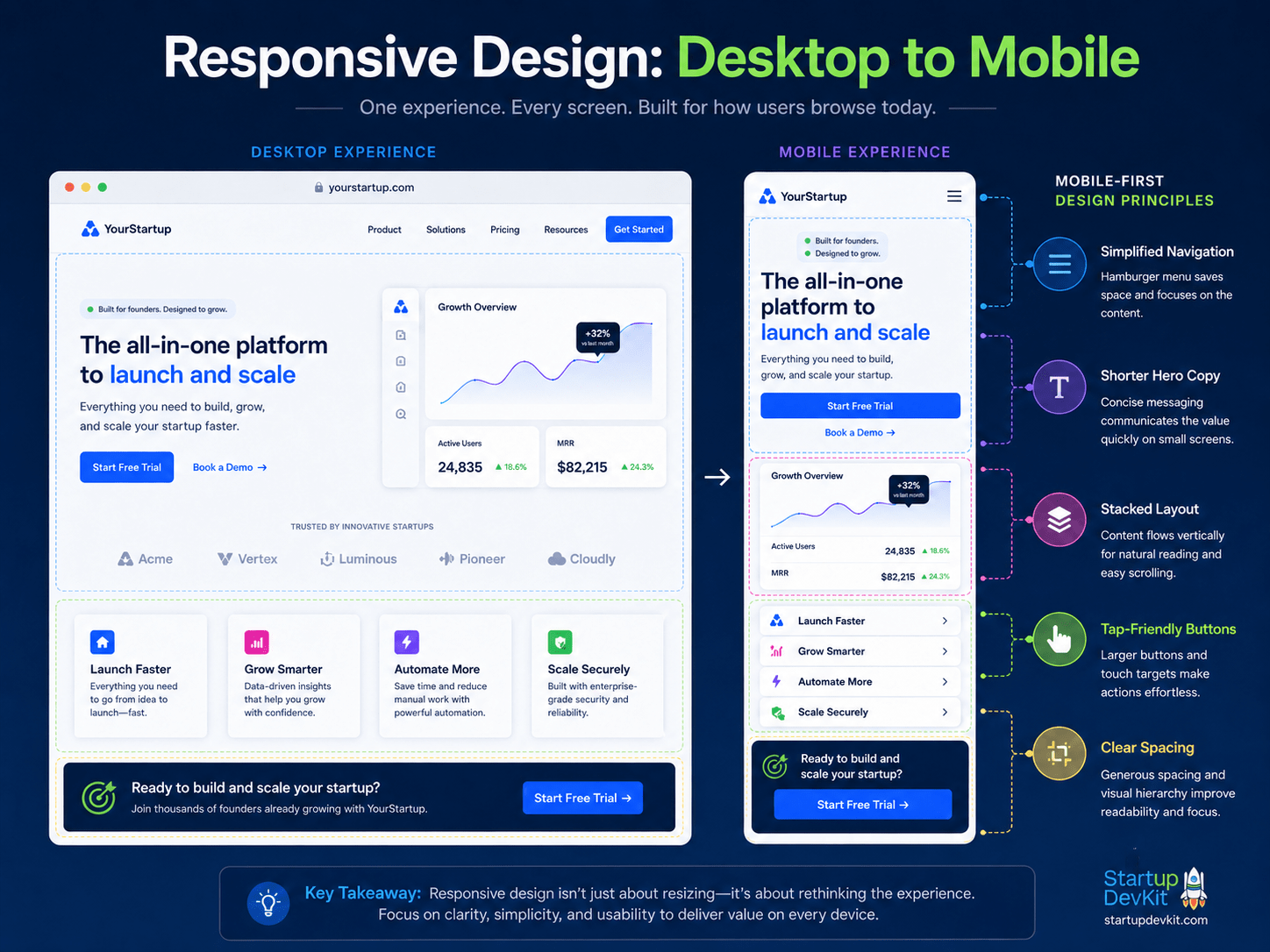
Responsive design is not just resizing a page. It is adapting structure, spacing, and usability for smaller screens.
Mobile visitors should not have to pinch, zoom, or fight the layout.
Test your most important pages on actual phones.
A page can look great in a desktop editor and still feel awkward in a real mobile experience.
How to Reduce Friction and Increase Conversions
Friction is anything that makes the visitor’s next step harder, slower, more confusing, or less appealing.
Some friction is obvious.
A broken checkout page is friction.
A slow-loading website is friction.
A confusing form is friction.
But some friction is more subtle.
- Vague copy is friction.
- Too many choices are friction.
- Hidden pricing is friction.
- Unclear plan differences are friction.
- A lack of social proof is friction.
- No explanation of what happens after signup is friction.
Your job is to remove unnecessary friction without removing the information visitors need to make a decision.
Keep Forms Short When Intent Is Low
If someone is signing up for a newsletter, downloading a lead magnet, or creating a free account, do not ask for too much information too soon.
A first name and email address may be enough.
The more fields you add, the more commitment you ask for.
There are times when longer forms make sense, especially for qualified demo requests, enterprise inquiries, applications, or high-ticket services.
But for early-stage interest, keep the form simple.
You can collect more information later as the relationship develops.
Be Careful With Popups
Popups, banners, slide-ins, and exit-intent offers can work.
They can also annoy visitors.
If you use them, make sure they are relevant, well-timed, and easy to close.
Do not stack multiple popups on top of each other.
Do not interrupt visitors before they have had a chance to understand the page.
And do not use aggressive tactics that make your startup feel desperate.
A good popup offers something genuinely useful at the right moment.
Make CTAs Specific
Generic CTAs like “Submit” or “Learn More” are not always bad, but they are often weaker than more specific options.
Better CTA examples include:
- Start Building Your Roadmap
- View Membership Plans
- Get the Free Checklist
- Create Your Free Account
- Compare Plans
- Try the Platform
- Download the Guide
- Book a Demo
A good CTA tells the visitor what will happen next.
Reduce Checkout Friction
If your startup sells directly through the website, the checkout process should be as simple as possible.
Avoid:
- unnecessary account creation
- surprise fees
- unclear billing terms
- long forms
- confusing plan names
- too many checkout steps
If you:
- need account creation, make it feel natural and connected to the purchase.
- offer guest checkout, make it easy to use.
- offer subscriptions, explain renewal and cancellation terms clearly.
The checkout page is not the place to create doubt.
Add Trust Signals Near Important Actions
Trust signals are especially important near CTAs, pricing sections, signup forms, and checkout pages.
Examples include:
- Cancel anytime
- No credit card required
- Secure checkout
- Trusted by founders
- Used by teams at
- Money-back guarantee
- Instant access
- Free trial available
- Founder-led support
- Transparent pricing
The right trust signal can reduce hesitation at the exact moment someone is deciding whether to act.
When to Use Free Trials, Freemium, Demos, or Direct Sales
Not every startup should use the same conversion model.
The right path depends on your product, price point, complexity, customer type, and sales cycle.
Free Trial
A free trial works well when visitors can experience value within a short period of time.
This is common for SaaS products, platforms, memberships, and tools.
A strong free trial should include:
- fast onboarding
- clear first action
- helpful guidance
- usage reminders
- lifecycle emails
- clear upgrade path
The mistake many startups make is offering a free trial without activation support.
A free trial does not convert just because it exists.
It converts when users experience value before the trial ends.
Freemium
Freemium works well when the free version provides real value but leaves room for meaningful upgrades.
A freemium plan can help reduce barriers to entry and increase product adoption.
However, freemium can also attract low-intent users if the upgrade path is not clear.
A good freemium model should define:
- what free users get
- what paid users get
- what usage limits exist
- what upgrade moments are likely
- how free users will be nurtured
Freemium is not just a pricing model.
It is an activation and conversion strategy.
Demo
Demos are useful when the product is complex, expensive, customized, collaborative, or enterprise-oriented.
However, not every visitor wants to book a demo before understanding the product.
If you use demos, give visitors enough information before asking for their time.
Include:
- product screenshots
- use cases
- pricing guidance when possible
- FAQs
- case studies
- a clear explanation of who the demo is for
A good demo CTA works best when it feels like a helpful next step, not a forced gate.
Direct Purchase
Direct purchase works well when the product is easy to understand and the buying decision is simple.
This can include ecommerce products, templates, digital products, low-cost software, courses, and memberships.
For direct purchase, your website needs:
- clear product details
- transparent pricing
- strong risk reducers
- simple checkout
- trust signals
- clear post-purchase expectations
The easier the purchase, the less friction your website should introduce.
How to Use AI to Build and Improve Your Startup Website
AI can help founders build better startup websites faster.
But AI should not replace strategy.
It should help you clarify, draft, test, and improve your work.
The quality of AI output depends on the quality of context you provide.
If you ask AI to “write homepage copy for my startup,” you will probably get generic copy.
If you give it your audience, problem, offer, differentiation, customer objections, pricing model, and desired conversion action, you can get something much more useful.
Use AI to Clarify Your Positioning
Before writing your website, use AI to pressure-test your positioning.
You can ask:
- Who is the clearest target audience for this offer?
- What problem does this product appear to solve?
- What parts of this positioning are vague?
- What objections would a visitor likely have?
- What is the strongest value proposition?
- What claims need more proof?
This can help you find gaps before you design the page.
Use AI to Draft Homepage Sections
AI can help draft:
- hero headlines
- subheadlines
- problem sections
- how-it-works steps
- feature-benefit sections
- use-case sections
- FAQ questions
- CTA variations
- risk reducers
A useful prompt:
Act as a startup website conversion strategist. Based on the following startup description, draft a homepage structure with a hero section, problem section, value proposition section, how-it-works section, use cases, social proof placeholders, pricing preview, FAQ, and final CTA. Keep the copy clear, specific, and conversion-focused.
Then provide your startup details.
Use AI to Plan Visual Sections
AI can also help you think through the visual structure of each page.
For example, you can ask:
For each section of this startup homepage, recommend the best visual format. Suggest whether each section should use a screenshot, card layout, product video, founder photo, diagram, icon row, testimonial block, pricing preview, or CTA band. Explain why.
This can help you avoid publishing a page that is technically well-written but visually flat.
Use AI to Turn Features Into Benefits
Founders often describe what their product has instead of what it helps users accomplish.
AI can help translate features into benefits.
Prompt:
Turn the following product features into customer-facing benefits. For each one, explain what the feature is, why it matters, and what outcome it helps the customer achieve.
This is useful for product pages, pricing pages, landing pages, emails, and onboarding flows.
Use AI to Generate FAQ and Objection Copy
AI can help identify objections visitors may have.
Prompt:
Based on this product and target customer, list the objections that may prevent someone from signing up. Then turn those objections into FAQ questions and answer them in a clear, honest, reassuring way.
This can help you build stronger FAQ sections across your homepage, product pages, pricing page, and checkout page.
Use AI to Improve CTAs
A CTA should match the visitor’s intent.
AI can help create CTA variations for different stages.
For example:
- low intent: Download the Guide
- medium intent: See How It Works
- high intent: Start Free
- buying intent: View Plans
- enterprise intent: Request a Demo
Prompt:
Generate 20 CTA button options for this page. Group them by visitor intent: low intent, medium intent, high intent, and buying intent.
Use AI to Analyze Analytics and Heatmap Notes
If you use analytics, heatmaps, or session recordings, AI can help interpret patterns.
For example, you can summarize observations like:
- Visitors scroll to pricing but do not click.
- Visitors click the FAQ more than the CTA.
- Visitors leave on mobile after the hero section.
- Visitors start checkout but do not complete it.
Then ask AI:
Based on these observations, what are the most likely conversion issues, and what A/B tests should I run first?
AI will not magically know the answer, but it can help you think through possibilities faster.
Use AI Without Publishing Generic Content
AI is a tool, not a substitute for insight.
Do not publish generic AI copy without editing it.
Your website should still reflect:
- your customer knowledge
- your product reality
- your founder insight
- your positioning
- your proof
- your actual offer
AI can help you move faster, but your judgment is what makes the content credible.
Analytics, Testing, and Optimization Stack
You do not need every tool in the world to improve your startup website.
But you should have enough data to understand what is happening.
Analytics
Analytics tools help you understand traffic and behavior.
Common options include:
- Google Analytics 4
- Plausible
- Fathom
- PostHog
At minimum, track important pages and conversion events.
Behavior Analytics
Behavior analytics tools help you see how people interact with your pages.
Examples include:
- Hotjar
- Microsoft Clarity
- FullStory
- PostHog
These tools can help you understand scroll behavior, clicks, form friction, and where visitors may be getting stuck.
Email and CRM
If your website captures leads, you need a way to follow up.
Email and CRM tools can help you:
- deliver lead magnets
- send onboarding emails
- segment users
- track engagement
- trigger automations
- nurture prospects
Examples include ActiveCampaign, HubSpot, ConvertKit, Beehiiv, and similar platforms.
Forms and Lead Capture
Forms should be simple, reliable, and connected to your follow-up system.
Depending on your stack, you might use:
- native website forms
- Contact Form 7
- Gravity Forms
- Fluent Forms
- Typeform
- Tally
- ConvertBox
- Poptin
- OptinMonster
The tool matters less than the strategy.
Offer something useful, keep the form simple, and follow up well.
A/B Testing
A/B testing can help you improve important pages.
You can test:
- hero headlines
- CTA copy
- plan labels
- pricing page layouts
- free trial vs freemium CTAs
- short vs long forms
- FAQ placement
- lead magnet offers
- video placement
- product screenshot placement
Start with high-impact pages first.
Do not waste time testing tiny details if your core messaging is unclear.
Startup Website Conversion Checklist
Use this checklist to review your startup website.
Strategy
- Is the target audience clear?
- Is the main problem clear?
- Is the core outcome clear?
- Is the offer easy to understand?
- Is the next step obvious?
- Does the website match the visitor’s stage of awareness?
Homepage
- Does the hero section explain the value quickly?
- Is there a clear primary CTA?
- Is there a secondary CTA for lower-intent visitors?
- Does the page explain the problem?
- Does the page show how the product works?
- Does the page include strong visuals?
- Does the page include trust signals?
- Does the page include FAQs or objection handling?
- Does the page end with a strong CTA?
Product Pages
- Does each product page explain who it is for?
- Does it connect features to benefits?
- Does it show the product, process, or output?
- Does it include screenshots, videos, or examples?
- Does it include use cases?
- Does it answer common objections?
- Does it link to pricing or the next best action?
Pricing Page
- Are the plans easy to compare?
- Is it clear who each plan is for?
- Is the best-fit plan highlighted appropriately?
- Are billing terms clear?
- Are cancellation or refund terms clear?
- Is there a pricing FAQ?
- Does the page explain what happens after signup?
- Are plan CTA clicks tracked?
Visual Design
- Is there a clear visual hierarchy?
- Does the page use enough whitespace?
- Are colors and gradients helping attention instead of distracting?
- Are CTAs visually consistent?
- Are screenshots or visuals used where they clarify the message?
- Are videos placed where they help the visitor make a decision?
- Does the mobile layout feel clean and easy to use?
Lead Capture
- Is there a useful lead magnet or lower-friction offer?
- Are forms short enough for the visitor’s intent?
- Are emails or automations connected properly?
- Does the thank-you page guide the next step?
UX and Performance
- Is the site mobile-friendly?
- Is the text easy to scan?
- Are buttons easy to tap?
- Are images compressed?
- Is the site fast enough?
- Are forms easy to use?
- Is the navigation simple?
Trust
- Are testimonials, examples, founder credibility, or proof included?
- Are product screenshots or previews available?
- Are claims specific and believable?
- Are support or contact options clear?
- Does the website feel current and maintained?
Analytics
- Are important conversion events tracked?
- Do you know which pages drive signups?
- Do you know where visitors drop off?
- Are pricing page clicks tracked?
- Are checkout starts and completions tracked?
- Are you reviewing the data regularly?
Conclusion
A startup website that converts is not just a collection of pages.
It is a guided journey.
Your:
- homepage should create clarity.
- product pages should explain the offer.
- pricing page should help visitors make a confident decision.
- blog and resources should educate the right audience.
- visuals should guide attention.
- CTAs should move people toward the next best action.
- analytics should show you what to improve.
And with AI, founders can now move faster than ever by drafting better copy, generating page structures, identifying objections, planning visual layouts, improving CTAs, and analyzing user behavior.
But AI does not replace customer insight.
The best startup websites still come from understanding the audience, communicating real value, reducing friction, and helping visitors take action with confidence.
If you want to build a stronger startup website, do not start by asking:
What should this page look like?
Start by asking:
- Who is this for?
- What do they need to understand?
- What do they need to believe?
- What action should they take next?
- What visual structure will help them get there?
When your website answers those questions clearly, it becomes more than a website.
It becomes part of your growth engine.